Historical Archive
This page is preserved as a historical reference. Microsoft discontinued Outlook Live Domains (Windows Live Custom Domains) in April 2014. New registrations are no longer possible and the service is no longer available.
For current @yourdomain.com email hosting options, see the Email Setup page, which covers recommended providers including Google Workspace, Zoho Mail, FastMail, and Rackspace Email.
How to Setup Free @yourdomain.com Email Accounts
The original intention for Centmin Mod was for low memory VPS usage, so email was typically offloaded from the server. In the past, Google Apps provided free @yourdomain.com email backed by Gmail technology, but Google closed the free edition to new users.
Outlook Live Domains from Microsoft was one of the free alternatives. Live Domains was backed by the same technology used for Outlook.com and provided @yourdomain.com email addresses. The key difference was that Google Apps supported both POP and IMAP while Outlook Live Domains only supported POP email.
Live Domains Features
Besides @yourdomain.com email, each account user got access to the full suite of Microsoft Outlook features including:
- Email hosting
- Maps
- Profiles
- Photos
- SkyDrive
- Groups
- Calendar
Benefits of Offloading Email from Server
- Most Centmin Mod installs are on low-end VPSes with 128MB–512MB memory. Offloading email reduces the overall memory footprint.
- Stability and higher uptime - if your VPS goes down, email is still reliably handled.
- Better spam and virus management. Third-party services like Gmail or Outlook have enterprise-level spam filtering.
Service Discontinued
Update: April 12th, 2014
Microsoft announced it would close new registrations for its free Windows Live Custom Domains service. Microsoft shifted focus to paid offerings via Office 365 subscriptions, with the cheapest being the Small Business plan at $5/user/month. Google Apps Business edition was a comparable alternative at $5/user/month or $50/user/year with 30GB storage.
Update: July 4th, 2015
A new @yourdomain.com email page was created covering current alternatives. See the Email Setup page for the latest recommendations.
Given the complexity of managing your own hosted email service - combatting spam and viruses, achieving high uptime - a paid offering is still worth it for at least single-user usage. The reliability and security of email is especially important for domain registration, SSL certificate validation, and social media account verification.
Alternative Email Providers
The following providers offered @yourdomain.com email hosting as alternatives to Outlook Live Domains. For current pricing and recommendations, see the Email Hosting Providers section on the email setup page.
| Provider | Pricing (2014) | Notes |
|---|---|---|
| FastMail | $40/yr | Personal Enhanced plan with 15GB email + 5GB file storage |
| Rackspace Email | $2/mailbox/month | 25GB storage, free 14-day trial, migration services |
| Zoho Mail | Free (5 users) | Free tier with 5GB/user, paid plans from $2.50/user/month |
| Atmail | $2/user/month | Minimum 5 users |
Original Setup Steps
The following steps documented the original Outlook Live Domains setup process. These are preserved for historical reference only - the service is no longer available.
Requirements: You needed a Windows Live, Outlook, or Hotmail ID to proceed.
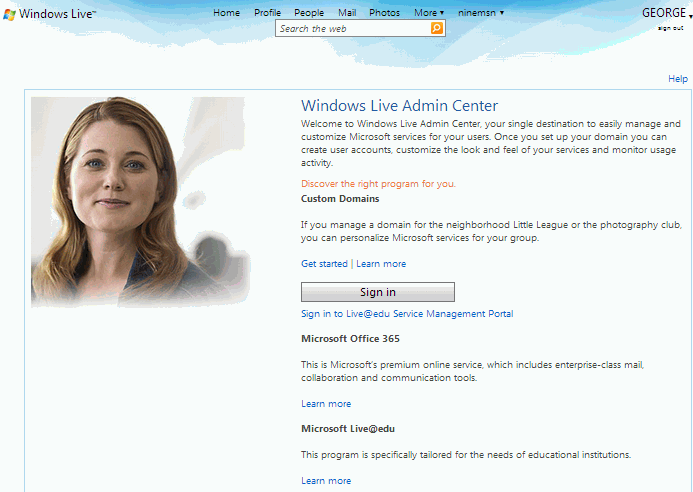
Step 1: Sign In
Sign in with your Windows Live ID at domains.live.com and find the Get Started link under the Custom Domains heading.
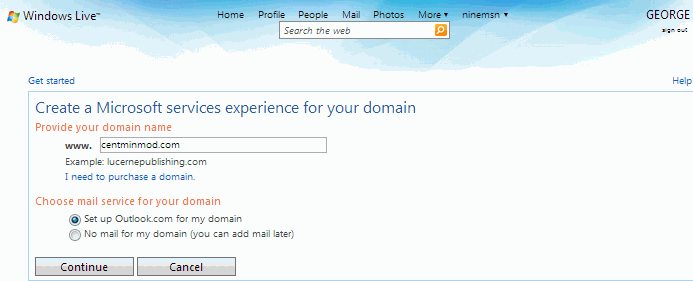
Step 2: Enter Domain
Enter your intended domain name that you set up on your Centmin Mod server in the provided box and ensure “Set up Outlook.com for my domain” is checked.
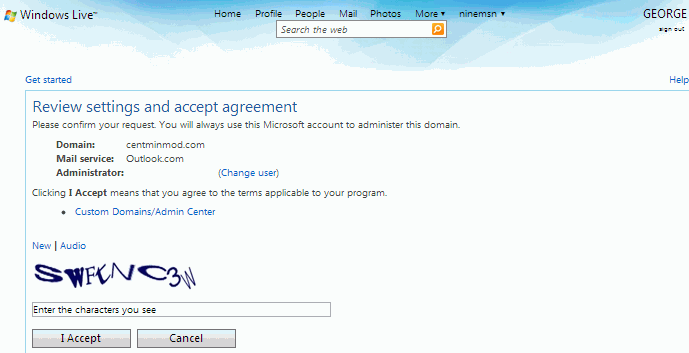
Step 3: Review Agreement
The next page reviews settings and prompts to accept the agreement.
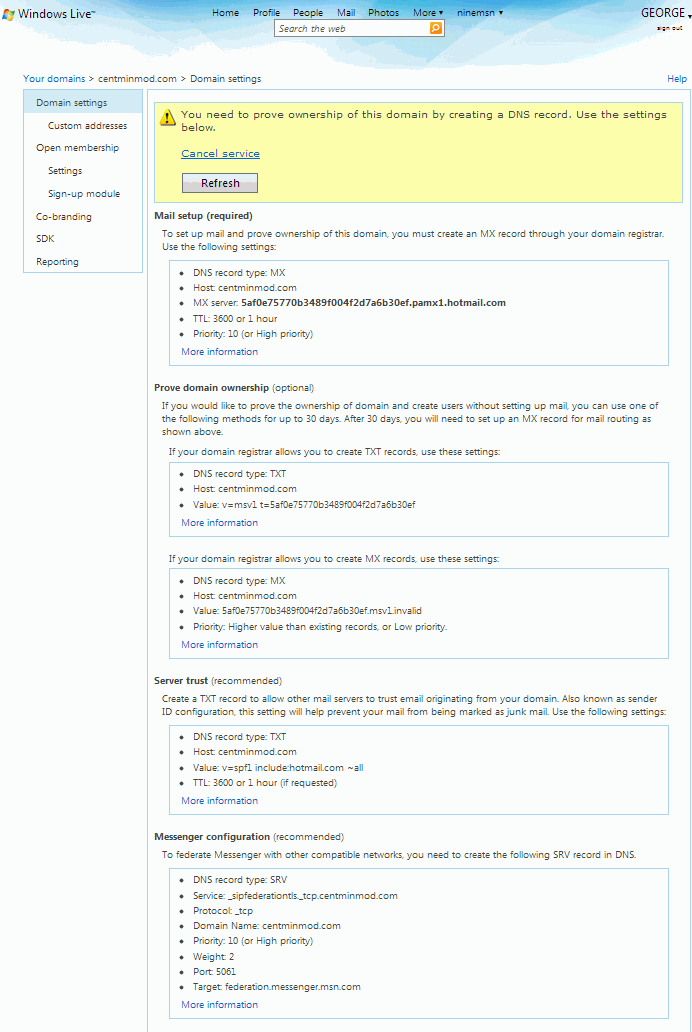
Step 4: DNS Setup
You would be provided with all the DNS changes needed to set up your account, plus instructions to prove domain ownership. DNS changes would be made with your domain registrar if using third-party DNS, or by editing your NSD zone file if hosting DNS on Centmin Mod (e.g., /etc/nsd/master/yourdomain.com.zone).
You may also need to set up appropriate SPF TXT records and reverse DNS A/AAAA records for your domain.
Step 5: Add Users & Access Email
Once DNS changes propagated, you could log back into domains.live.com to add user accounts and custom addresses via CNAME DNS changes. Up to 500 free email user accounts could be created. Email was accessed via mail.live.com or through a custom CNAME address like webmail.yourdomain.com.
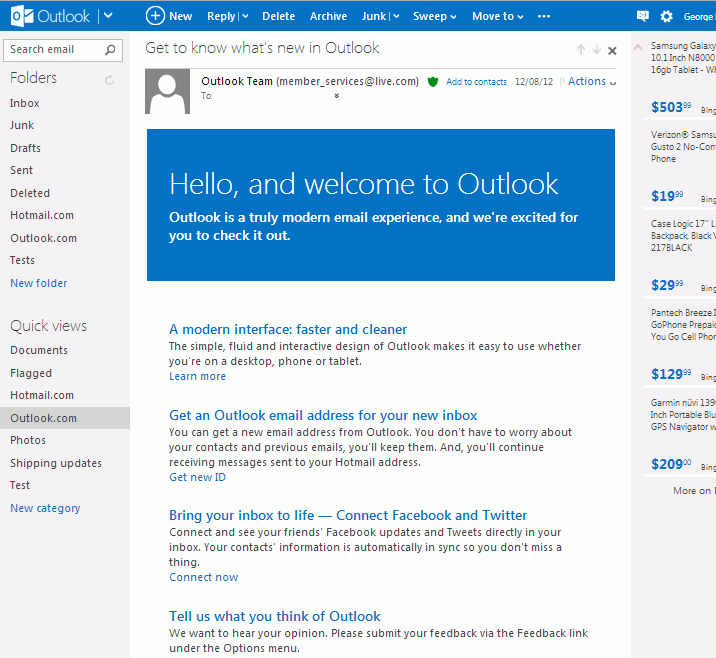
Browser Extensions
The following browser extension was recommended for Outlook Live Domains users:
- For Chrome browser users: Outlook Notifier extension (may no longer be available)
POP / SMTP Configuration
The following settings were used to configure email clients for sending and receiving Outlook Live Domains email.
Incoming (POP3) Server
- Server: pop3.live.com
- Port: 995
- SSL Encryption: Yes
Outgoing (SMTP) Server
- Server: smtp.live.com
- Port: 25 (or 587 if 25 is blocked)
- Authentication: Yes
- TLS/SSL: Yes
- User name: Your email address
- Password: Your password
If POP3 was set to delete messages after downloading, Outlook.com saved a copy in a “POP” folder until the delete command was verified. Users could manage this via Options → More mail settings → POP and deleting downloaded messages.
SPF Records & Troubleshooting
Microsoft Outlook Live Domains used the Sender ID Framework, which checked your domain’s DNS SPF text records and reverse DNS lookup. Proper SPF TXT records and reverse DNS A (IPv4) and AAAA (IPv6) records were required for reliable email delivery.
Example SPF Records
A typical SPF TXT record where xxx.xxx.xxx.xxx is your server’s IP address:
v=spf1 a mx ip4:xxx.xxx.xxx.xxx a:hostname.yourdomain.com ~allFor Outlook Live Domains with the MX record from setup:
v=spf1 include:hotmail.com a mx ip4:xxx.xxx.xxx.xxx a:hostname.yourdomain.com ~allIf using Centmin Mod’s NSD DNS, you would edit the TXT record in your domain’s zone file (e.g., /etc/nsd/master/yourdomain.com.zone):
; TXT Record (for SPF)
newdomain.com.       14400   IN      TXT     "v=spf1 a mx ip4:newdomainipaddress ~all"
Relevant Links
- For current SPF, DKIM, and DMARC setup guidance, see the Email Setup - DNS Records page
- SPF Record Testing Tools are available at MXToolbox SPF Lookup
Looking for Current Email Solutions?
This page is a historical archive. For up-to-date @yourdomain.com email hosting recommendations, transactional email services, SPF/DKIM/DMARC configuration, and troubleshooting guidance:
View Email Setup Guide